
How to Make a Wedding, Tilak or Pooja Invitation Card Online (Hindi & English)
In this article
A printed card is still the most respectful way to invite family, but most invitations today travel on WhatsApp first. With the free invitation card maker you can make a beautiful Hindi or English invitation in a few minutes — for a wedding, Tilak, Sagai, pooja, Diwali party or birthday — and download it as a high-quality image you can share on WhatsApp or print.
Choose a design by occasion
The designs are grouped by occasion, so you only see the cards that fit your event. Click a category at the top of the editor:
| Category | For | Designs |
|---|---|---|
| Wedding · विवाह | Shubh Vivah cards, with both families, wedding date, muhurat and venue | 12 |
| Tilak · तिलक | Tilak Samaroh invitations from the bride’s or groom’s family | 4 |
| Engagement · सगाई | Sagai Samaroh, Roka and ring ceremony cards | 4 |
| Pooja · पूजा | Griha pravesh, Satyanarayan katha and other pooja invitations, with a programme of rituals | 2 |
| Festival · त्योहार | Diwali and festival get-togethers | 2 |
| Birthday | Birthday and milestone parties | 2 |
| Baby Shower | Godh bharai and baby shower | 1 |
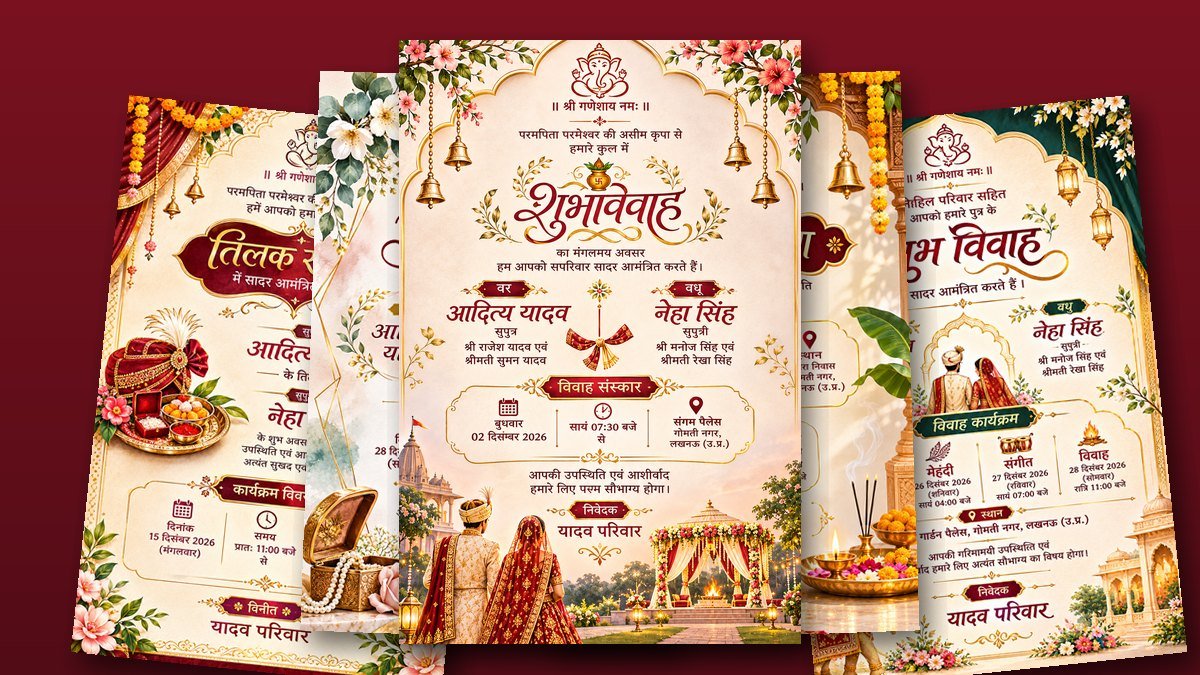
New designs are added regularly. Most of the newer cards are designed in Hindi with traditional artwork — Ganesha, kalash, marigolds, bells and mandap — and every word on them can be changed.
How to make your invitation card
- Open the invitation card maker and pick a category, for example Wedding or Tilak.
- Click a design to open it. The card on the right shows sample text.
- Fill in the fields on the left: names, parents’ names, date, time, venue and the host family. The card updates as you type.
- Check every line on the preview, especially spellings of names and the venue address.
- Click Download to save the card as a PNG image.
Writing in Hindi
You can type in Hindi (Devanagari) in any field — use your phone’s Hindi keyboard or Google Input Tools on a computer. A few things are done for you:
- Dates are written in Hindi automatically on the Hindi cards. Pick the date from the calendar and the card shows it the traditional way, for example 15 दिसंबर 2026 (मंगलवार) — the weekday is worked out for you, so it can’t be wrong.
- Long names fit. On the designer cards, if a name or address is longer than the sample, the text gets slightly smaller so it stays inside its space instead of running over the artwork.
- Fixed headings stay beautiful. Calligraphy such as शुभ विवाह, तिलक समारोह and सगाई समारोह is part of the artwork, so it always looks as the designer drew it.
What to write on the card
A traditional Hindi invitation usually follows this order. You don’t need every line — leave out what doesn’t apply.
- Blessing: ॥ श्री गणेशाय नमः ॥ at the top.
- Invitation line: for example “परमपिता परमेश्वर की असीम कृपा से हमारे सुपुत्र के…”.
- The couple: names, with “सुपुत्र / सुपुत्री” and the parents’ names under each.
- Programme: date, time (muhurat) and venue; for weddings, the Haldi, Mehndi, Sangeet and Vivah dates if you list them.
- Closing line: “आपकी उपस्थिति एवं आशीर्वाद हमारे लिए परम सौभाग्य होगा।”
- From: the host family under “निवेदक” or “विनीत”, for example यादव परिवार.
Write the venue the way guests will search for it on maps — the hall’s name, area and city — and add a phone number if the place is hard to find.
Sharing on WhatsApp and printing
The download is a sharp PNG image (2048 × 3072 pixels for the designer cards), so it stays crisp when guests zoom in on their phones. Send it as a photo on WhatsApp, or as a document if you want to avoid WhatsApp’s compression.
The designer cards have a 2 : 3 shape, which is exactly the size of standard 4 × 6 inch photo paper. Any photo shop can print them without cropping — ask for 4 × 6 prints at 100% (“actual size”). For larger cards, 8 × 12 inch prints keep the same shape.
Preview watermark and download
While you edit, the preview shows a light FreeToolConvert · PREVIEW watermark. The card you download has no watermark. Downloading needs a free account and uses credits (currently 20 credits per card — see pricing).
Privacy
The card is filled in and made in your browser. Names, addresses and phone numbers you type are not uploaded to our server — only the download itself is recorded to use your credits.
Frequently asked questions
Can I make the card in English?
Yes. Every field accepts English or Hindi, and you can mix both — for example English names on a Hindi card.
Can I change the design’s colours or artwork?
The artwork and headings are fixed so the card always looks as designed; all the text is yours to change. If one design doesn’t suit, try another in the same category — the details you need to enter are similar.
Can I leave a line empty?
Yes. Clear the field and that line is left out of the card. On cards with a list, such as the pooja programme, an empty row leaves a gap, so it’s usually better to rephrase the line.
Does it work on a phone?
Yes. On a phone, tap Edit invitation details to open the fields, then scroll down to see the card.
Making a marriage biodata as well? Try the free biodata maker, with traditional designs and a ready PDF.