
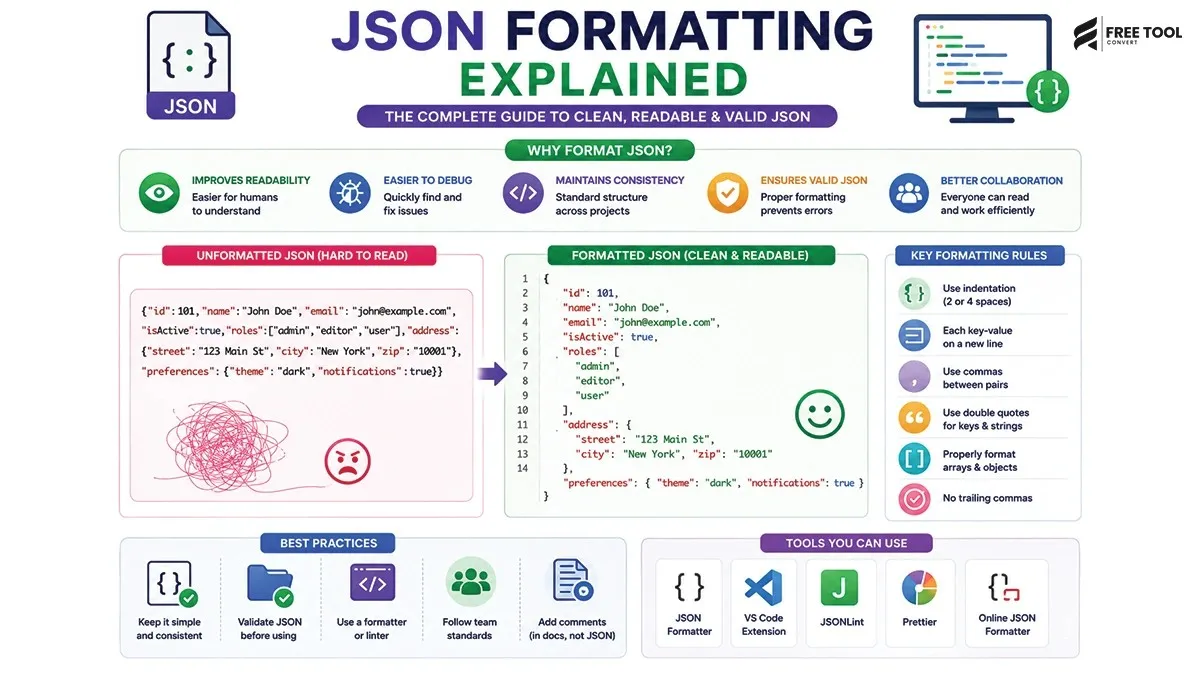
JSON Formatting Explained: JSON (JavaScript Object Notation) is the backbone of modern web development. It powers APIs, web apps, mobile applications, and data exchange across systems.
But raw JSON is often messy, hard to read, and difficult to debug.
This is where JSON formatting becomes essential.
A properly formatted JSON file:
- Improves readability
- Makes debugging easier
- Prevents errors
- Enhances productivity
With a free JSON Formatter & Validator tool, you can instantly clean and structure your JSON data.
Table of Contents
What Is JSON?
JSON is a lightweight data-interchange format used to store and transmit data.
Example of Raw JSON:
What Is JSON Formatting?
JSON formatting (also called JSON beautification) is the process of organizing JSON data into a structured, readable format using:
- Indentation
- Line breaks
- Proper spacing
Formatted JSON Example
Notice how much easier it is to read.
Why JSON Formatting Is Important
Improves Readability
Clean structure makes data easy to understand.
Easier Debugging
Quickly find errors in complex JSON.
Better Collaboration
Teams can read and edit data easily.
Prevents Syntax Errors
Formatting highlights mistakes.
Enhances Productivity
Develop faster with clean data.
What Is a JSON Formatter?
A JSON Formatter is a tool that automatically:
- Beautifies JSON
- Validates syntax
- Detects errors
- Structures data
Using a free JSON formatter online, you can instantly clean messy JSON.
Why Use FreeToolConvert JSON Formatter?
FreeToolConvert JSON Formatter & Validator offers:
- 100% free usage
- Instant formatting
- Error detection
- Syntax validation
- Clean structured output
- No login required
- Secure processing
- Mobile-friendly interface
How to Format JSON Online (Step-by-Step Guide)
Step 1: Open JSON Formatter
Access FreeToolConvert tool.
Step 2: Paste JSON Data
Insert your raw JSON.
Step 3: Click Format
The tool beautifies your JSON instantly.
Step 4: Validate JSON
Check for syntax errors.
Step 5: Copy Output
Use formatted JSON in your project.
Features of JSON Formatter Tool
- JSON beautifier
- JSON validator
- Syntax highlighting
- Error detection
- Copy functionality
- Fast processing
Common JSON Errors and Fixes
Missing Quotes
Incorrect:
Correct:
Trailing Comma
Incorrect:
Correct:
Incorrect Brackets
Incorrect:
Correct:
JSON Formatter vs JSON Validator
| JSON Formatter | JSON Validator |
| Beautifies JSON | Checks errors |
| Improves readability | Ensures correctness |
| Adds structure | Detects syntax issues |
FreeToolConvert provides both.
JSON Formatting for Developers
Developers use JSON formatting to:
- Debug APIs
- Format responses
- Improve readability
- Validate data
JSON Formatting for APIs
Used in:
- REST API responses
- Data exchange
- Backend communication
JSON Formatting for Data Analysts
Analysts use it to:
- Clean data
- Analyze datasets
- Improve readability
JSON Formatting for Beginners
Helps beginners:
- Understand JSON structure
- Learn data formatting
- Avoid syntax errors
SEO Benefits of JSON (Structured Data)
JSON is used in SEO through:
JSON-LD
Structured data for search engines.
Rich Snippets
Improves search visibility.
Better Indexing
Helps search engines understand content.
JSON Formatting vs Minification
| Formatting | Minification |
| Readable | Compact |
| For developers | For performance |
| Uses spaces | Removes spaces |
Best Practices for JSON Formatting
- Use consistent indentation
- Validate JSON before use
- Avoid unnecessary nesting
- Use meaningful keys
- Keep structure clean
Common Mistakes to Avoid
- Missing quotes
- Incorrect brackets
- Trailing commas
- Invalid data types
Mobile-Friendly JSON Formatting
FreeToolConvert allows:
- Format JSON on mobile
- Copy instantly
- No app required
Advanced Features of JSON Tools
- Real-time validation
- Syntax highlighting
- Error detection
- Large file support
Future of JSON Tools
With AI:
- Smart error correction
- Auto-formatting
- Data suggestions
- API integration
Security & Privacy
FreeToolConvert ensures:
- Secure processing
- No data storage
- Privacy protection
Conclusion
JSON formatting is essential for clean, readable, and error-free data. Whether you’re a developer, analyst, or beginner — properly formatted JSON improves efficiency and reduces errors.
With FreeToolConvert JSON Formatter & Validator, you can instantly format and validate JSON data — completely free and easy to use.
If you want better readability, faster debugging, and cleaner data — start using a free JSON formatter today.
Frequently Asked Questions : JSON Formatting Explained
What is JSON formatting?
It organizes JSON into readable structure.
Is JSON formatter free?
Yes, FreeToolConvert offers it free.
Can it detect errors?
Yes, it validates JSON syntax.
Why is JSON important?
Used in APIs and data exchange.
Can I use it on mobile?
Yes, fully compatible.
What is JSON-LD?
A format used for structured data in SEO.
Format JSON Instantly
Ready to clean your JSON?
Open FreeToolConvert JSON Formatter
Paste your JSON
Format instantly
Copy structured output
Start using the free JSON formatter online today and simplify your workflow effortlessly!