
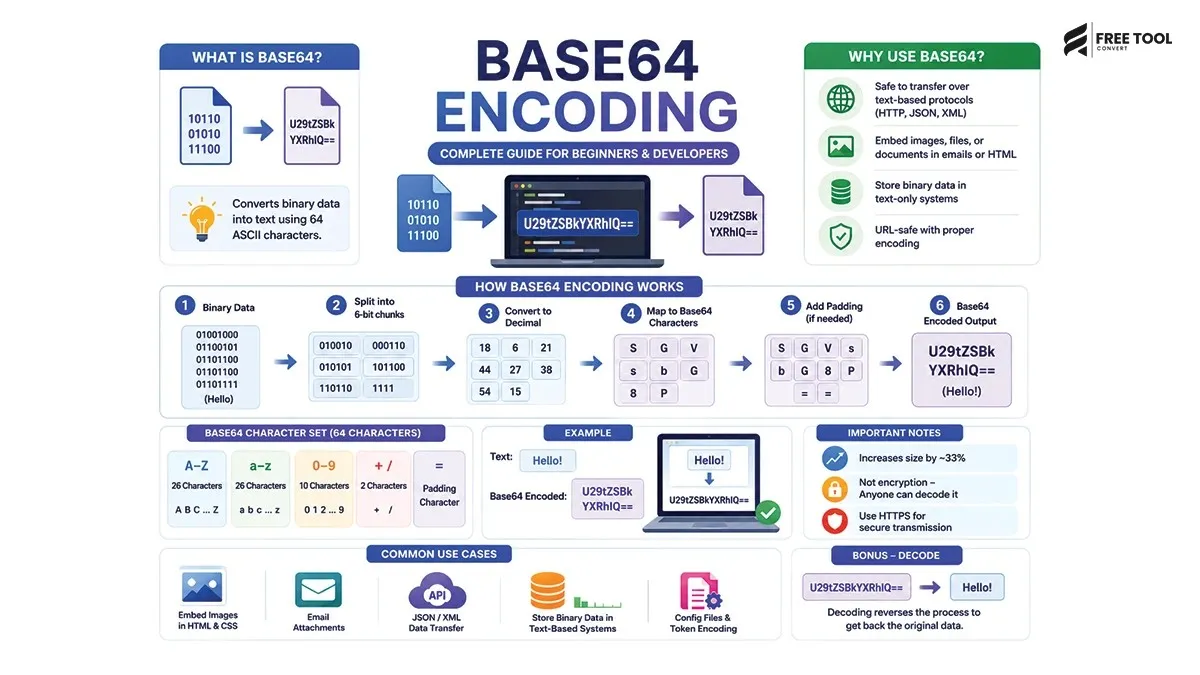
What is Base64 Encoding: In the world of web development, APIs, and data transmission, you often encounter situations where binary data (like images, files, or media) needs to be safely transferred over systems that only support text.
This is where Base64 encoding comes into play.
It is a widely used technique that converts binary data into a text format, making it easier to transmit over networks, embed in HTML/CSS, and store in text-based systems.
Table of Contents
What is Base64 Encoding?
Base64 encoding is a method of converting binary data into a text string using a specific set of 64 characters.
These 64 characters include:
- Uppercase letters (A–Z)
- Lowercase letters (a–z)
- Numbers (0–9)
- Symbols (+ and /)
It also uses = as padding.
In simple words:
Base64 turns complex binary data into readable text.
Why Is Base64 Encoding Used?
Base64 is used because many systems are designed to handle text data only, not raw binary.
Key reasons:
Safe Data Transmission
Ensures data is not corrupted during transfer.
Email Attachments
Used in MIME encoding for sending files.
Embedding Images in HTML/CSS
Allows inline images using data URLs.
API Data Transfer
Used in JSON and XML responses.
Storage in Text-Based Systems
Stores binary data in databases safely.
How Base64 Encoding Works
Base64 works by converting binary data into groups of 6 bits.
Process:
- Binary data is divided into 6-bit chunks
- Each chunk is mapped to a Base64 character
- Padding (=) is added if needed
Example of Base64 Encoding
Original Text:
Base64 Encoded:
Base64 Character Table
Base64 uses a fixed character set:
- A–Z – 0–25
- a–z – 26–51
- 0–9 – 52–61
- – 62
- / – 63
Base64 Encoding vs Decoding
| Encoding | Decoding |
| Converts binary → text | Converts text → binary |
| Used for transmission | Used for reconstruction |
Common Use Cases of Base64
Embedding Images in HTML
Email Attachments
Used in MIME encoding.
API Authentication
Used in Basic Auth headers.
Storing Files in JSON
Binary data converted to text.
Advantages of Base64 Encoding
Universal Compatibility
Works across all systems.
Safe Transmission
Prevents data corruption.
Easy Integration
Works with HTML, CSS, JSON.
No Special Handling Required
Treated as plain text.
Disadvantages of Base64 Encoding
Increased File Size
Encoded data is ~33% larger.
Not Encryption
Base64 is not secure.
Processing Overhead
Requires encoding/decoding steps.
Base64 vs Encryption
| Base64 | Encryption |
| Encoding method | Security method |
| Easily reversible | Requires keys |
| Not secure | Secure |
Important:
Base64 is NOT encryption.
Base64 in Web Development
Developers use Base64 for:
- Inline images
- Font embedding
- Data transfer
- API communication
Base64 for SEO & Performance
Benefits:
- Reduces HTTP requests
- Useful for small images
Drawbacks:
- Increases page size
- Not ideal for large images
When to Use Base64 Encoding
Use Base64 when:
- Embedding small images
- Sending data in APIs
- Handling email attachments
- Working with text-based systems
When NOT to Use Base64
Avoid Base64 when:
- Working with large files
- Performance is critical
- Security is required
Base64 Encoding Tools
You can easily encode/decode using:
- FreeToolConvert Base64 Encoder/Decoder
- Online tools
- Programming languages
Base64 in Programming Languages
JavaScript
Python
Common Mistakes to Avoid
- Treating Base64 as encryption
- Using it for large files
- Ignoring size increase
- Not decoding properly
Best Practices for Base64 Usage
- Use for small data only
- Avoid for large images
- Combine with encryption if needed
- Optimize performance
- Use reliable tools
Future of Data Encoding
With evolving technologies:
- More efficient encoding formats
- Better compression methods
- AI-based data optimization
Conclusion
Base64 encoding is a simple yet powerful technique for converting binary data into text format. It plays a crucial role in web development, APIs, email systems, and data transmission.
While it offers convenience and compatibility, it’s important to understand its limitations—especially regarding file size and security.
If you need a quick and reliable way to encode or decode data, using a free Base64 encoder/decoder tool is the best solution.
Frequently Asked Questions
What is Base64 encoding used for?
It converts binary data into text for safe transmission.
Is Base64 secure?
No, it is not encryption.
Why does Base64 increase size?
Because it uses text representation.
Can I decode Base64 easily?
Yes, using tools or programming languages.
Where is Base64 used?
APIs, emails, HTML, CSS, and data storage.
Is Base64 still used today?
Yes, widely used in modern applications.
Encode & Decode Instantly
Want to use Base64 easily?
Open FreeToolConvert Base64 Tool
Paste your data
Encode or decode instantly
Copy results
Start using the free Base64 encoder/decoder online today and simplify your data handling!