
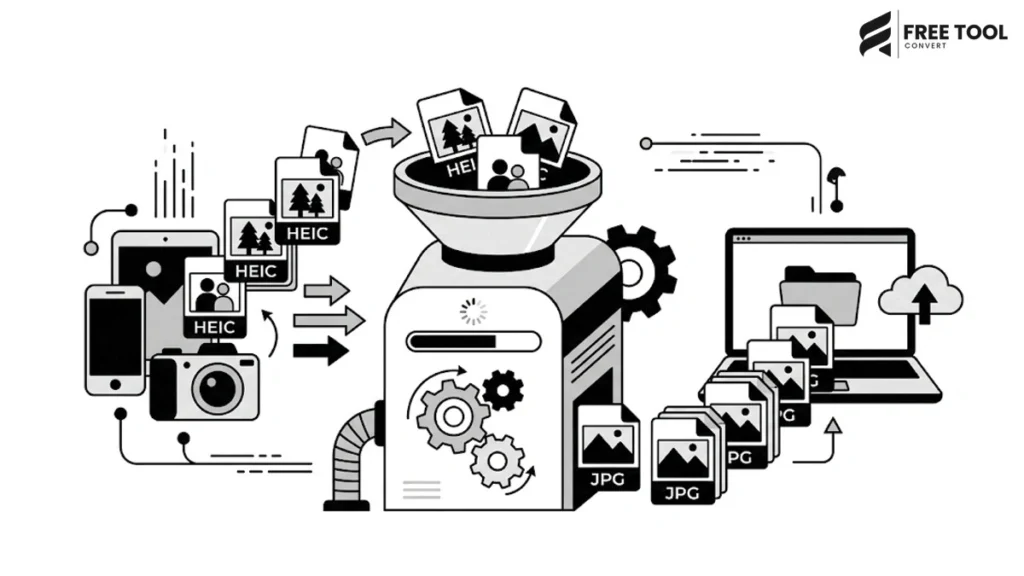
Converting HEIC Images to JPG Online for Free: With the rise of modern smartphones, especially iPhones, the HEIC (High Efficiency Image Format) has become the default image format for storing photos. While HEIC offers better compression and higher quality, it often creates compatibility issues when sharing images across different platforms, devices, and applications.
This is where a HEIC to JPG Converter becomes essential.
Whether you’re trying to upload photos to a website, share images via email, use them in design tools, or simply open them on a Windows system, converting HEIC to JPG ensures universal compatibility.
Using FreeToolConvert’s HEIC to JPG Converter, you can quickly transform HEIC images into JPG format without losing quality — completely free, secure, and online.
Let’s explore everything you need to know about converting HEIC to JPG efficiently.
Table of Contents
What Is HEIC Format?
HEIC (High Efficiency Image Container) is a modern image format introduced by Apple. It uses advanced compression technology to store high-quality images in smaller file sizes compared to traditional formats like JPG.
Key Features of HEIC:
- Smaller file size
- High image quality
- Better compression than JPG
- Supports multiple images in one file
- Used by iPhones and iPads
Despite its advantages, HEIC is not universally supported, which creates the need for conversion.
What Is JPG Format?
JPG (or JPEG) is one of the most widely used image formats in the world.
Key Features of JPG:
- Universal compatibility
- Supported by all devices and browsers
- Ideal for web and sharing
- Smaller file size (with compression)
- Easy to upload and edit
Converting HEIC to JPG ensures your images can be used anywhere without compatibility issues.
Why Convert HEIC to JPG?
Here are the top reasons to use a HEIC to JPG converter online for free:
1. Universal Compatibility
JPG works on all platforms, including Windows, Android, web browsers, and software tools.
2. Easy Sharing
JPG files can be easily shared via email, WhatsApp, and social media.
3. Website Upload Support
Most websites do not support HEIC uploads.
4. Editing Flexibility
JPG files are supported by all editing tools like Photoshop, Canva, etc.
5. Better Workflow Integration
JPG fits into all digital workflows seamlessly.
Why Use FreeTool Convert HEIC to JPG?
FreeToolConvert’s HEIC to JPG Converter is designed to provide the following:
- Fast and accurate conversion
- High-quality image output
- No watermark
- 100% free usage
- Secure file handling
- No software installation
- Works on all devices
It is one of the best free online tools for converting HEIC images instantly.
How to Convert HEIC to JPG Online (Step-by-Step Guide)
Using FreeToolConvert is simple:
Step 1: Upload HEIC Image
Drag and drop your HEIC file into the converter.
Step 2: Automatic Conversion
The tool processes your image instantly.
Step 3: Download JPG File
Download your converted JPG image in seconds.
No technical skills required.
Features of FreeToolConvert HEIC to JPG Converter
- Convert HEIC to JPG online free
- Batch conversion support
- High-quality output
- Fast cloud processing
- Mobile-friendly interface
- Secure encryption
- Auto file deletion
- No registration required
These features make it a reliable tool for everyday use.
HEIC vs JPG – Key Differences
| Feature | HEIC | JPG |
| Compatibility | Limited | Universal |
| Compression | Advanced | Standard |
| File Size | Smaller | Moderate |
| Editing Support | Limited | Wide |
| Web Usage | Not supported widely | Fully supported |
JPG is still the preferred format for compatibility.
HEIC to JPG for iPhone Users
iPhone users often face issues when sharing HEIC images.
Using FreeToolConvert, you can:
- Convert iPhone photos instantly
- Share on WhatsApp or email
- Upload to websites
- Edit in any software
This simplifies cross-device usage.
HEIC to JPG for Windows Users
Windows systems often do not support HEIC by default.
Converting HEIC to JPG helps:
- Open images easily
- Edit using standard tools
- Share without compatibility issues
HEIC to JPG for Designers & Creators
Designers convert HEIC to JPG to:
- Use images in Photoshop, Illustrator, Canva
- Create marketing materials
- Design social media posts
- Maintain workflow compatibility
HEIC to JPG for Businesses
Businesses use HEIC to JPG conversion for:
- Product images
- Documentation
- Client presentations
- Marketing assets
JPG ensures smooth operations.
SEO Benefits of Using JPG Images
While HEIC is efficient, JPG is better for web SEO:
- Supported by all browsers
- Faster rendering
- Better indexing
- Improved page speed
- Enhanced user experience
Using JPG improves website performance.
Image Quality After Conversion
FreeToolConvert ensures:
- Minimal quality loss
- High-resolution output
- Accurate color retention
- Clean image structure
The converted JPG looks visually identical.
Batch HEIC-to-JPG Conversion
You can convert multiple files at once:
- Upload multiple HEIC files
- Convert in bulk
- Download all JPG images together
Saves time and effort.
Is HEIC to JPG Conversion Safe?
Yes, FreeToolConvert ensures:
- HTTPS encryption
- Secure file processing
- Automatic deletion after 1 hour
- No data storage
Your privacy is protected.
Mobile HEIC to JPG Conversion
FreeToolConvert works seamlessly on mobile:
- Upload from iPhone gallery
- Convert instantly
- Download JPG
- Share directly
No app required.
Common Mistakes to Avoid
- Uploading corrupted HEIC files
- Using low-quality converters
- Compressing before converting
- Ignoring resolution settings
Always use a reliable tool like FreeToolConvert.
Advanced Features of FreeToolConvert
- Cloud-based conversion
- Fast processing engine
- Multi-device compatibility
- User-friendly interface
- No login required
Future of Image Conversion Tools
With AI and cloud computing, tools like FreeToolConvert will offer:
- Faster conversions
- Better compression
- Automatic format detection
- Smart optimization
The future is efficient and automated.
Conclusion: The Complete Guide to Converting HEIC Images to JPG Online for Free
A HEIC to JPG Converter is an essential tool for anyone dealing with modern image formats. While HEIC offers better compression, JPG remains the most compatible and widely accepted format across platforms.
With FreeToolConvert, you can convert HEIC to JPG instantly, securely, and for free — without compromising image quality.
Whether you’re a student, designer, business owner, or everyday user, this tool simplifies your workflow and ensures your images are ready for use anywhere.
If you want fast, reliable, and high-quality image conversion — FreeToolConvert is the perfect solution.
Frequently Asked Questions (FAQs): Converting HEIC Images to JPG Online for Free
1. What is HEIC format?
HEIC is a high-efficiency image format used by Apple devices.
2. Why convert HEIC to JPG?
To ensure compatibility with all devices and platforms.
3. Is FreeToolConvert free?
Yes, it is completely free to use.
4. Does conversion reduce quality?
Minimal to no noticeable quality loss.
5. Can I convert multiple HEIC files?
Yes, batch conversion is supported.
6. Is my data secure?
Yes, files are encrypted and auto-deleted.
Convert HEIC to JPG Instantly with FreeToolConvert
Ready to convert your HEIC images?
👉 Upload your HEIC file now
👉 Convert to JPG in seconds
👉 Download high-quality images instantly
👉 100% free, secure, and fast
Start using FreeToolConvert’s HEIC to JPG Converter today and make your images compatible everywhere!